Search Result
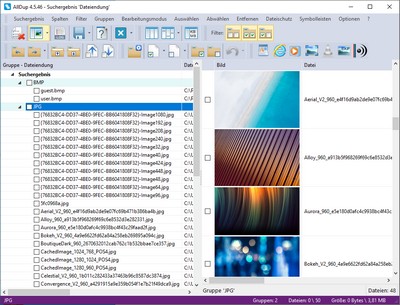
Groups
After the search is completed, all duplicate files will be displayed to you sorted in groups. A group contains all files that were identified as duplicates according to your selected search method. Each group has a reference file. All other files in this group are duplicates of this reference file. The reference file can be displayed in a different font color if required.Sorting Files and Groups
You can sort the content of the search result by clicking a column header with the left or right mouse button. Clicking with the left mouse button sorts only groups and not their content. Clicking with the right mouse button sorts the files within each group.Selecting Files
Files in the search result can be selected or deselected by clicking their checkbox, or you can use the automatic selection functions, which can be accessed via the menu bar or the toolbar.Marking Files and Groups
You can mark files and groups by holding the CTRL key and clicking them with the left mouse button. Right-click the marked files or groups to display a context menu with various commands.Deleting, Copying, Moving, or Renaming Files
Launch the File Manager via the menu or toolbar to process the selected files. You can also delete, copy, or move individual files without the File Manager by holding the CTRL key and right-clicking a file.Mouse Commands
- Right-clicking a group or a file opens a context menu with various commands.
- Holding the CTRL key and right-clicking a file opens the File Actions context menu with various commands.
- Middle-clicking a file opens the Windows Explorer context menu.
- Double-clicking a file name with the left mouse button opens the file with its associated program.
- Double-clicking a file path with the left mouse button opens it with Windows Explorer.
Keyboard Commands
- The Space key allows you to select or deselect a marked file or the entire content of a group.
- The F2 key allows you to rename a marked file.
- The Delete key removes all marked groups and files from the search result.
- The key combination CTRL + Delete allows you to delete a marked file.