File Preview
The file preview allows you to display different file types directly in the search result: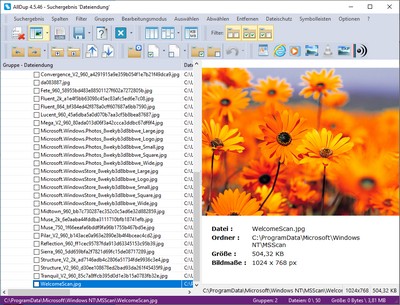
The file preview can be shown or hidden via the toolbar or menu bar.
Plugin Lists
Here you can specify which plugin should display a file in the search result preview. The file extensions in a list can be enabled and disabled using their checkbox. A right-click on a list will show you a context menu with the following commands:- Add
This allows you to add a new file extension to the list. - Remove
This allows you to remove a file extension from the list. - Select all
This selects all file extensions in the list. - Deselect all
This deselects all file extensions in the list. - Default values
This removes all file extensions from the list and adds the default file extensions for this plugin.
Plugins
- Windows WordPad
- Windows Internet Explorer
- Image Viewer
- VLC Media Player
- Windows Media Player
- EXIF Viewer
- Media Info Viewer
Plugin: Microsoft WordPad
This plugin can display all files supported by Microsoft WordPad or containing only text. Files with the following extensions, for example, can be displayed in the file preview:TXT, BAT, INI, LOG, CFG, DIZ, NFO, CSS, ASP, PHP, RTF, WRI, XML, INF, URL, REG, LST, EML, ERR, CSV, 1ST, VBS, ...
Plugin: Windows Internet Explorer
This plugin can display all files supported by Microsoft Internet Explorer. A prerequisite for this plugin is an existing installation of Microsoft Internet Explorer. Files with the following extensions, for example, can be displayed in the file preview:BMP, CAB, DIB, EMF, GIF, ICO, PNG, BMP, JPEG, JPG, HTM, HTML, PDF¹, DOC², DOCX², XLS², XLSX², PPT², PPS², SVG, SWF, TXT, WMF, ZIP
¹ Requires the installation of a PDF viewer with browser integration.
² Requires the installation of Microsoft Office.
Plugin: Image Viewer
This plugin displays graphic files with the following file extensions in the file preview:3FR, ARW, BMP, CR2, CRW, CUT, DCR, DIB, DNG, EMF, ERF, GIF, HDP, HEIC¹, HEIF¹, ICO, IFF, J2C, J2K, JP2, JPE, JPG, JPEG, JPX, JFIF, KDC, MDC, MEF, MOS, MRW, NEF, ORF, PEF, PBM, PCX, PGM, PNG, PPM, PSD, RAF, RAS, RAW, RW2, SRW, TGA, TIF, TIFF, RAS, RLE, WBMP, WEBP, WMF, X3F.
¹ For these file types, the installation of a HEIC/HEIF image extension, such as CopyTrans HEIC, is necessary.
Plugin: VLC Media Player
With this plugin, you can play all audio and video files supported by VLC Media Player. Files with the following extensions, for example, can be played with this plugin in the file preview:3G2, 3GA, 3GP, 3GP2, 3GPP, 669, A52, AAC, AC3, ADT, ADTS, AU, AIF, AIFC, AIFF, AMR, AMV, AOB, APE, ASF, ASX, AU, AVI, BIK, CAF, DIVX, DRC, DTS, DV, DVR-MS, EVO, F4V, FLAC, FLV, GVI, GXF, IT, M1V, M2T, M2TS, M2V, M4A, M4P, M4V, MID, MKA, MKV, MLP, MOD, MOV, MP1, MP2, MP2V, MP3, MP4, MP4V, MPA, MPC, MPE, MPEG, MPEG1, MPEG2, MPEG4, MPG, MPGA, MPV2, MTS, MTV, MXF, NSV, NUV, OGA, OGG, OGM, OGV, OGX, OMA, OPUS, QCP, RA, REC, RM, RMI, RMVB, RPL, S3M, SDP, SND, SPX, THP, TOD, TP, TS, TTA, TTS, VOB, VOC, VQF, VRO, W64, WAV, WEBM, WMA, WMV, WTV, WV, XA, XESC, XM.
A prerequisite for this plugin is the 32-bit version of the freeware VLC Media Player from version 3. The 32-bit version of VLC Media Player must either be installed on your Windows system, be available as a portable version on your Windows system, or be manually integrated into the AllDup folder.
Use portable version of VLC Media Player
Register the file axvlc.dll in the VLC Media Player folder with the following command on your Windows system:
regsvr32.exe axvlc.dllIntegrate VLC Media Player into the AllDup folder
- Open the FTP archive from the official VLC Media Player website.
- In the FTP archive, click on the folder with the latest version number (e.g. 3.0.8) at the bottom of the page, and then on the 32bit folder.
- Click on the ZIP file (e.g. vlc-3.0.8-win32.zip) to download it.
- Unpack the following files and folders from the ZIP file into the AllDup directory:
- Files: axvlc.dll, libvlc.dll, libvlccore.dll
- Folder: plugins
- Start AllDup once with admin rights so that the file axvlc.dll is automatically registered on your Windows system, or register the file axvlc.dll manually with the following command on your Windows system:
regsvr32.exe axvlc.dll
Plugin: Windows Media Player
This plugin plays all audio and video files supported by Windows Media Player: AU, AIF, AIFC, AIFF, ASF, AVI, M1V, MID, MIDI, MOV, MP4, MP3, MPEG, MPG, MP2, MPA, MPE, RMI, SND, WAV, WM, WMA, WMV, ...A prerequisite for this plugin is an existing installation of Windows Media Player.
Plugin: EXIF Viewer
This plugin displays the EXIF data of files with the following file extensions in the file preview:JPEG, JPG, TIF, TIFF, PNG, GIF und WAV.You can activate this plugin by selecting the EXIF Viewer button in the File Preview toolbar.